
Sometimes the mobile app doesn't ring and it's difficult to figure out what is going on and where to start with troubleshooting.
When the app is not open it is not registered to the platform, if a call comes in we send what is called a "Push Notification" which wakes up the app, and once the app is woken up a SIP INVITE is sent to initiate the call.
If for any reason this Push Notification is received/acknowledged by the app within 15 seconds, then the server will mark the call as "missed" and move on without sending any SIP INVITES.
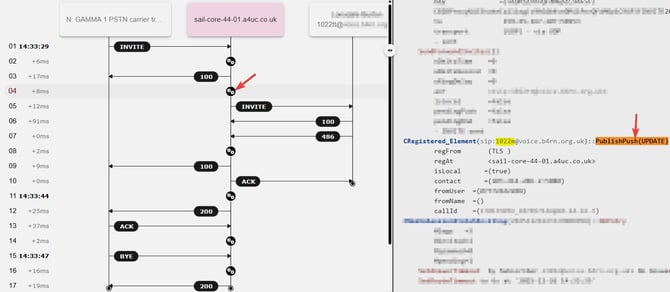
To see this in the SIP Trace, click on one of the "cog" icons to bring up the PBX switch logic of the call (you may need to check multiple). From there you will see a line titled "CRegistered_Element" along with the device that the push was sent to, and the comment "PublishPush(UPDATE)".
This shows when the push was sent to the device.
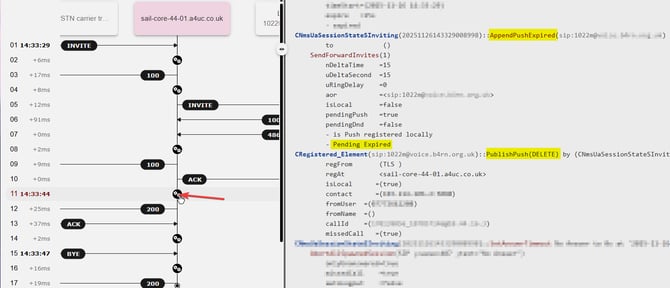
If we then go further down into the a later switch logic section, we can see that there is another update 15 seconds later showing "AppendPushExpired" and "PublishPush(DELETE)" which means that the server received no response from the mobile device and the push notification expired.
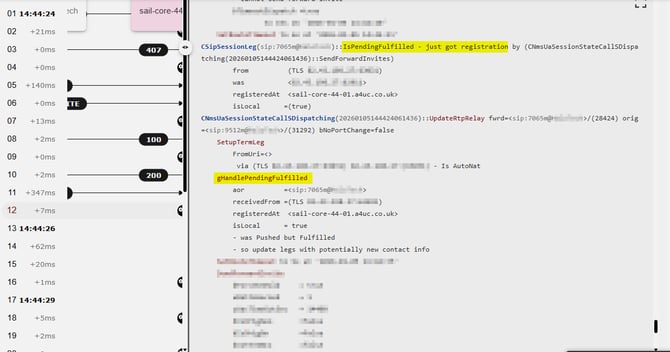
If the push IS received and responded to the device, you will instead see something like the below, where you have a message saying "IsPendingFulfilled - just got registration" followed by an action titled "gHandlePendingFulfilled"
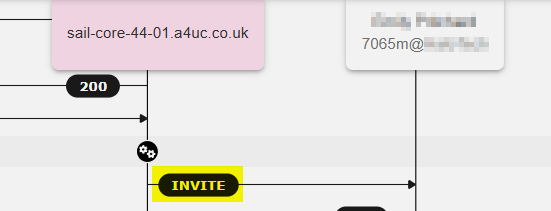
This would then be followed by a SIP INVITE to the mobile device, like below:
If a user has not received a call and you can that the push notifications are expiring like in the above examples, there could be many reasons for this. The main causes of this are Notifications being disabled on the user's phone, or network issues preventing the notifications being received by or responded by the device.
For further investigation we would need to review a SIP Trace and Log File sent from the phone which you can submit to us in a ticket via uhelp.access4.com.
It's important that both a SIP Trace AND a log file are provided for the same calls. Log files only store the past 2 hours of information, if you send a SIP Trace and the trace is not included in the log file, we will ask for another example.